Naming
Naming and Addressing in Distributed Systems
Fundamentals of Naming
Core Concepts
- Names: Used for the identification of objects, enabling resource sharing (e.g., Internet domain names) and communication (e.g., email addresses).
- Information Content:
- Pure Names: Uninterpreted bit patterns (contain no info about the object).
- Non-pure Names: Contain information about the object, such as its location.
Service Types
- Name Services: Store entries as
<name, attributes>(typically network addresses).- Lookup:
name\(\rightarrow\)attribute values(Name Resolution).
- Lookup:
- Directory Services: Store entries as
<name, attributes>but allow richer searches.- Lookup:
<name, attributes>,attribute values\(\rightarrow\)names(Reverse lookup or search by property).
- Lookup:
Composed Naming Domains (Resolution Process)
Resolving a complex name often involves traversing multiple layers:
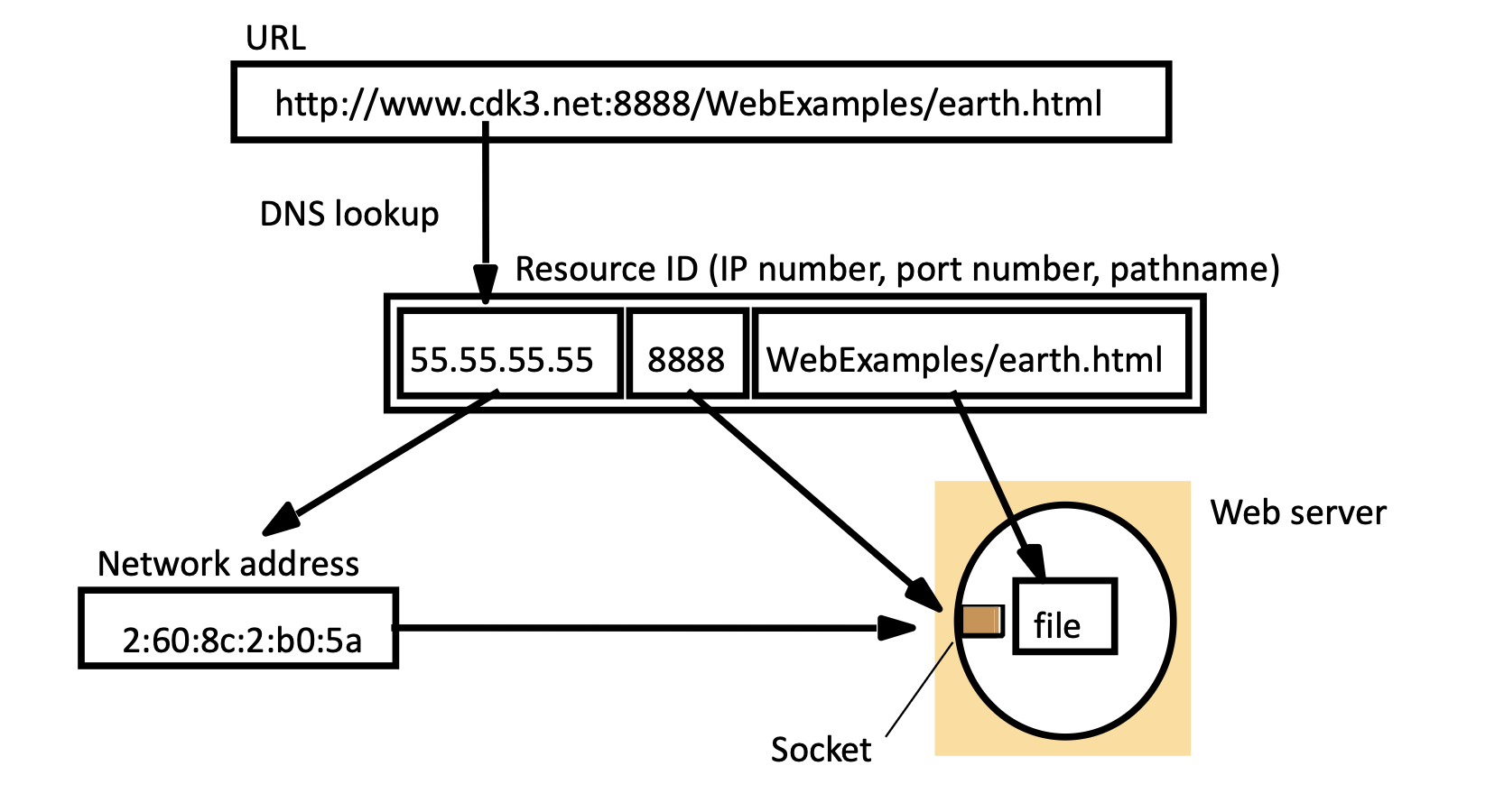
- URL Input: User enters
http://www.cdk3.net:8888/WebExamples/earth.html. - DNS Lookup: The domain
www.cdk3.netis resolved to an IP address (55.55.55.55). - Network Address: The system combines IP and Port (
8888) to form a socket address. - Local File System: The path
/WebExamples/earth.htmlis used by the web server to locate the specific file on disk.
Requirements for Name Services
To function effectively globally, name services must meet specific criteria:
- Global Uniqueness: Use conventions to ensure names are unique, enabling resource sharing.
- Scalability: Must handle internet-scale growth (directories grow very fast).
- Consistency: Short-term inconsistencies are tolerable, but the system must converge to a consistent state in the long term.
- Performance & Availability: Lookup operations must be fast and always available as they are at the heart of distributed apps.
- Adaptability: Must handle frequent organizational structure changes.
- Fault Isolation: The failure of some servers should not crash the entire system.
Name Spaces & Organization
- Name Space: The set of all valid names in a specific context (e.g., all valid URLs).
- Structure:
- Flat: Random numeric or symbolic identifiers (finite size).
- Hierarchical: Represents position or organizational structure (e.g., UNIX files, Internet domains). Potentially infinite size.
- Aliases: Allows a convenient/short name to substitute for a complicated one.
- Naming Graph: Represented as a tree with a Single Root, Directory Nodes (branches), and Leaf Nodes (data).
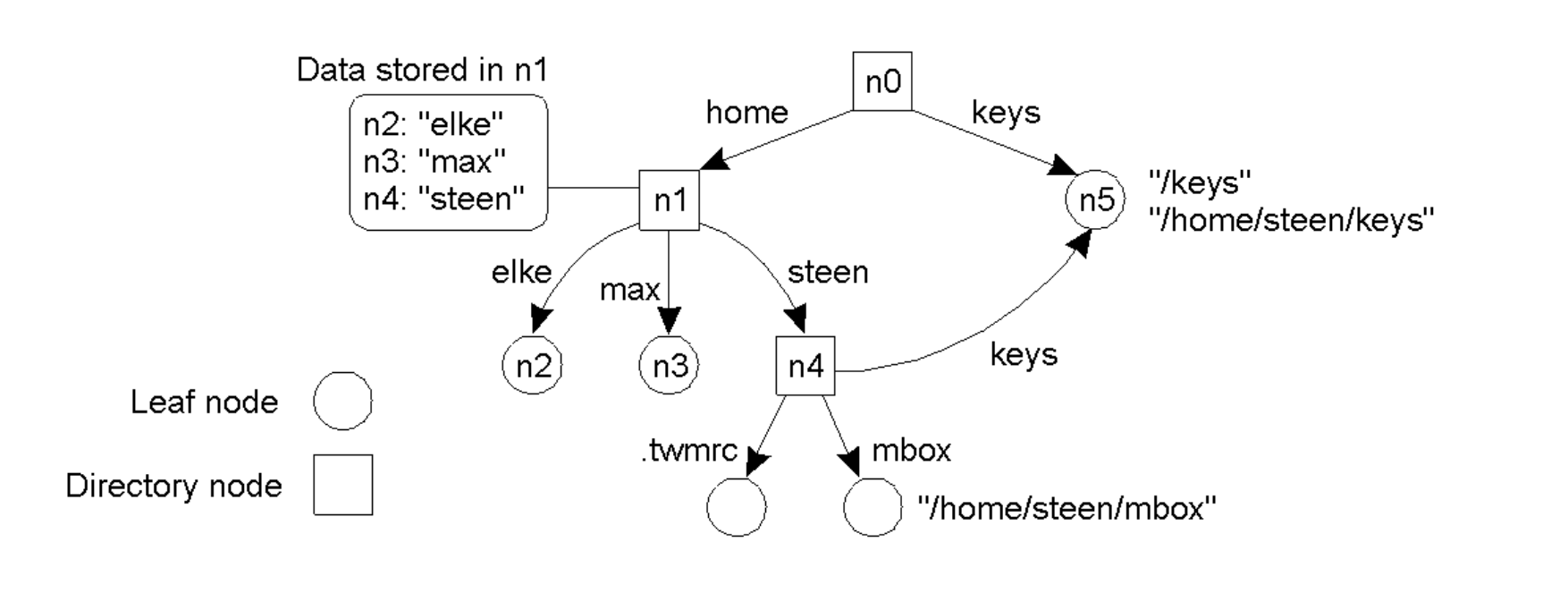
Optimizations
To handle massive scale, services use three key techniques:
- Partitioning: Data is split by domain; no single server holds all entries.
- Replication: Domains usually have multiple name servers to boost availability and performance.
- Caching: Servers and clients cache previous lookup results to avoid repeatedly contacting the same authority for the same name.
The Domain Name System (DNS)
Overview
- A distributed database implemented in a hierarchy of many name servers.
- An Application-layer protocol used by hosts and routers to resolve names (Address/Name translation).
Why Distributed (Not Centralized)?
A centralized solution is avoided because of:
- Single point of failure.
- Massive traffic volume.
- Distant database (latency).
- Maintenance difficulty.
- It doesn't scale!
Architecture Layers
The DNS Name Space is partitioned into three layers:
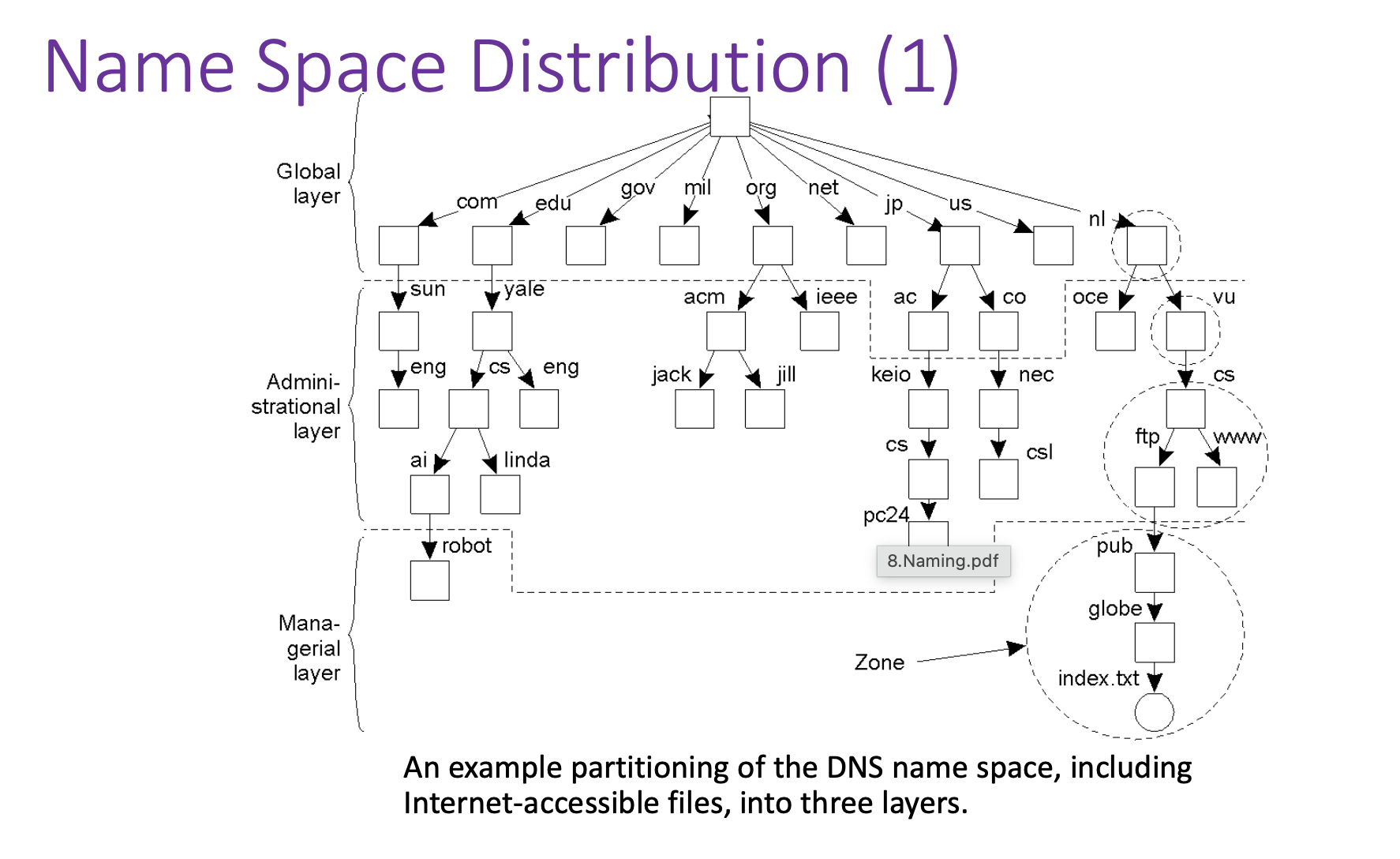
- Global Layer: Root and Top-Level Domains (com, edu, gov, etc.).
- Administrational Layer: Organizations (sun, yale, acm).
- Managerial Layer: Local departments (eng, cs, sales) and specific hosts (robot, index.txt).
Root Name Servers
- Contacted by local servers when they cannot resolve a name.
- There are 13 clusters of root servers worldwide.
- They use Anycast to route requests to the nearest cluster.
Name Space Distribution Characteristics
The DNS name space is partitioned into three layers, each with distinct operational characteristics:
| Feature | Global Layer (Root/TLD) | Administrational Layer (Org) | Managerial Layer (Dept) |
|---|---|---|---|
| Scale | Worldwide | Organization-wide | Department-wide |
| Node Count | Few | Many | Vast numbers |
| Responsiveness | Seconds | Milliseconds | Immediate |
| Updates | Lazy propagation | Immediate | Immediate |
| Replicas | Many | None or few | None |
| Caching | Yes | Yes | Sometimes |
Name Resolution Approaches
Definition:
The process of translating a name into its related attribute (typically an IP address).
- Iterative Resolution:
- The name server replies with the answer if it knows it.
- If it doesn't know, it replies with a referral to another server (e.g., "I don't know, but ask this server").
- The client is responsible for chasing the referrals.
- Recursive Resolution:
- The name server takes full responsibility for the name.
- If it doesn't know the answer, it contacts other servers on behalf of the client, returning only the final answer.
- Cycle Detection: Resolution aborts after a predefined number of attempts to prevent infinite loops caused by cyclic aliases.
- A cyclic alias is a broken map. Instead of leading you to the treasure (the file or the IP address), it leads you in a circle. It is a classic "Infinite Loop" problem applied to Naming Domains.
Navigation Models
Navigation describes how the naming data is accessed across multiple servers.
Iterative Navigation (Used in DNS)
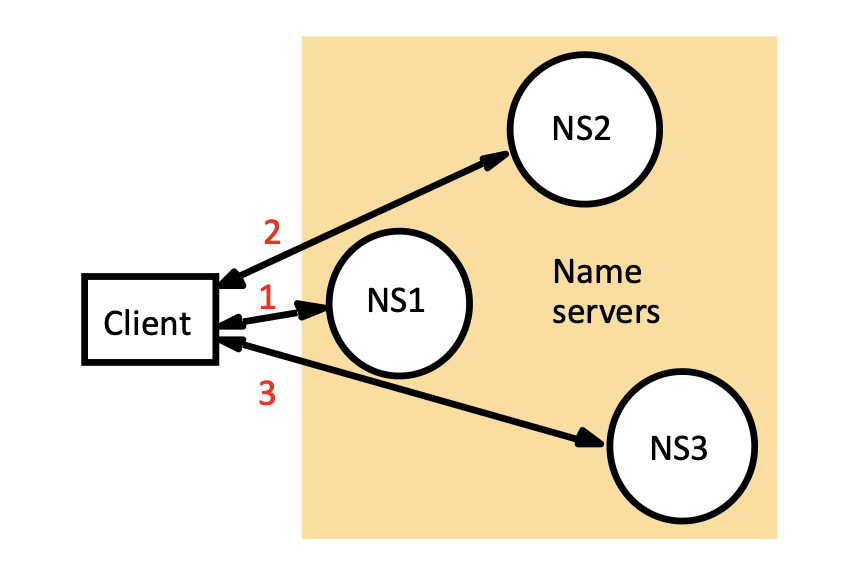
- Mechanism: The Client acts as the navigator.
- The Flow: Client contacts NS1 \(\rightarrow\) NS1 returns referral to NS2 \(\rightarrow\) Client contacts NS2 \(\rightarrow\) NS2 returns referral to NS3 \(\rightarrow\) Client contacts NS3 \(\rightarrow\) Result found.
- Pros/Cons: Reduces burden on root servers but requires more work from the client.
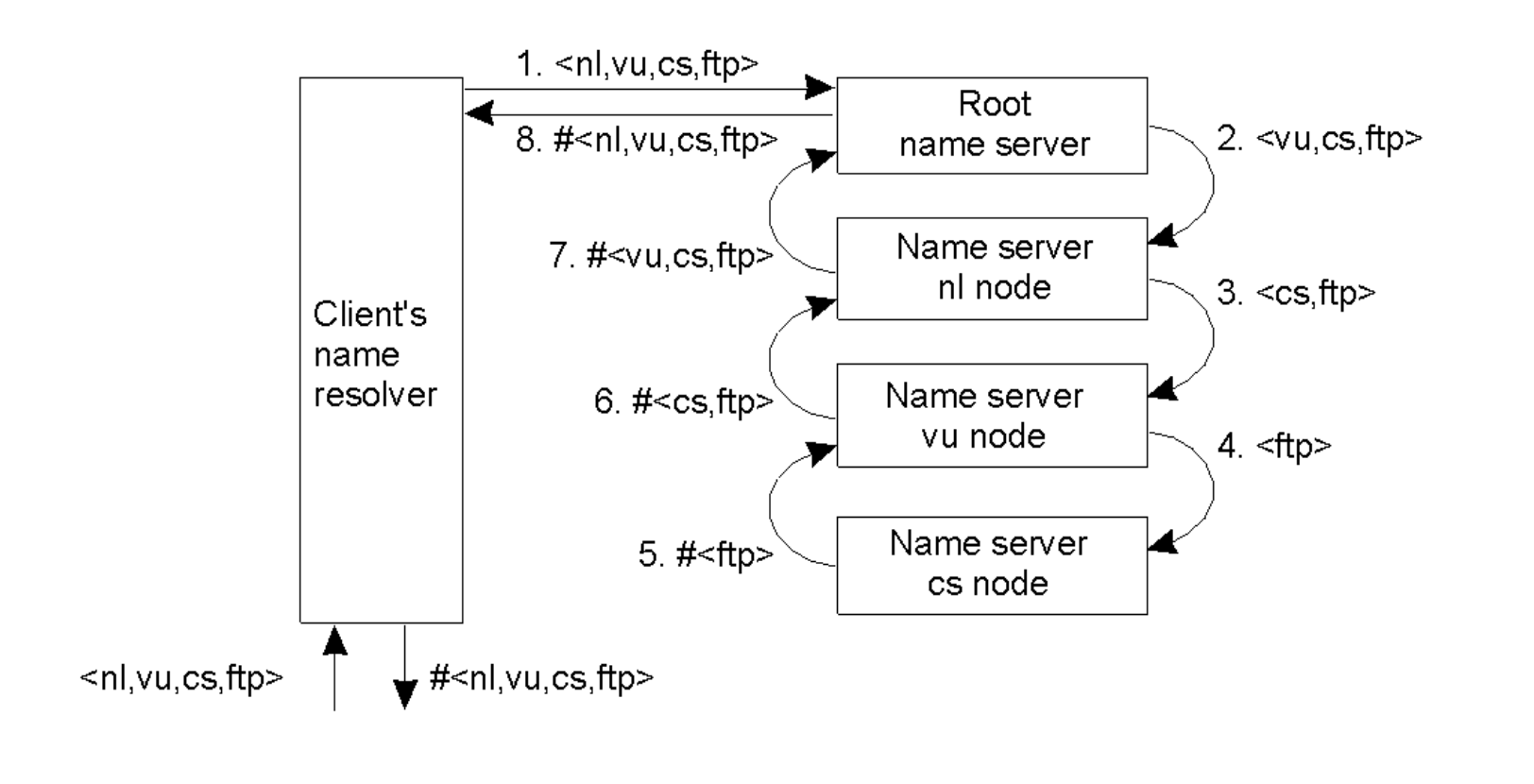
Recursive Navigation
- Mechanism: The Server acts as the navigator.
- The Flow: Client asks Root \(\rightarrow\) Root asks
nlnode \(\rightarrow\)nlasksvunode... The result bubbles back up the chain to the client. - Caching Benefit: Intermediate servers (like the
rootornlnode) learn and cache the result as it passes back through them, speeding up future lookups for other clients.
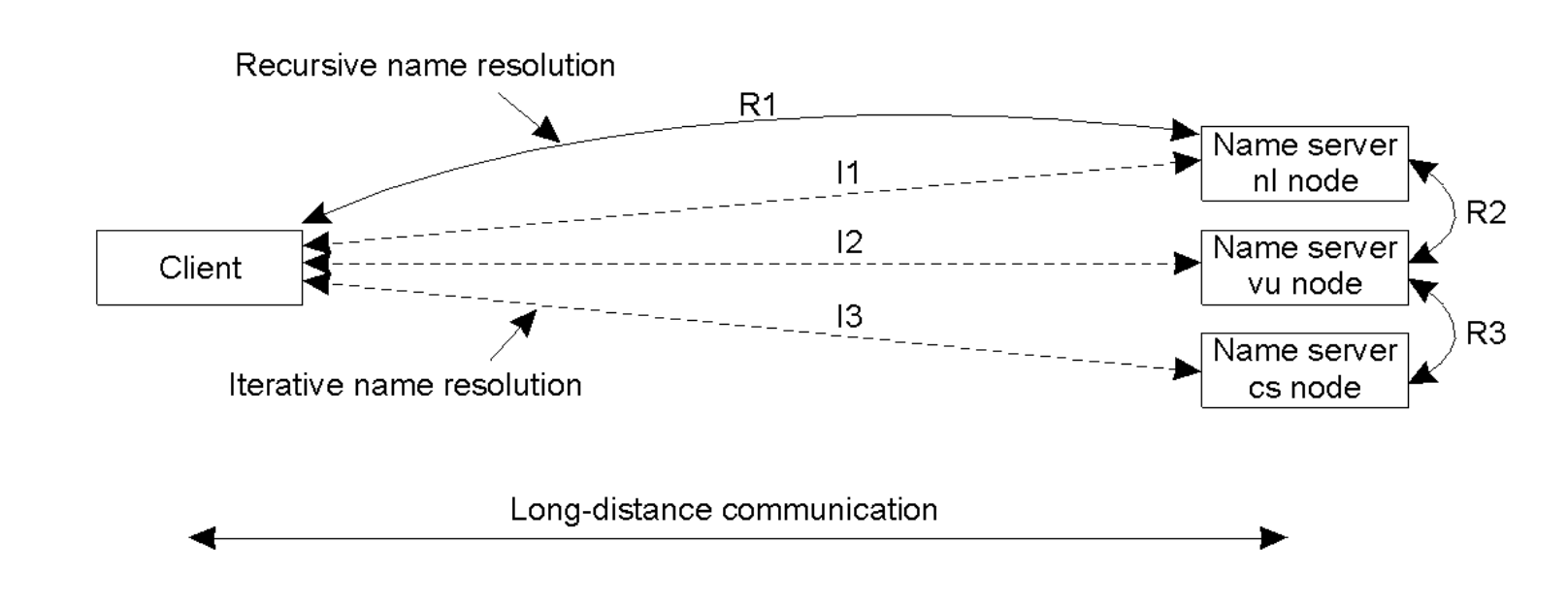
Comparison: Communication Cost
- Long-Distance Traffic: Recursive resolution is often more efficient for the client because the communication between name servers (which might be regional) avoids repeated long-distance round-trips from the client to various global servers.
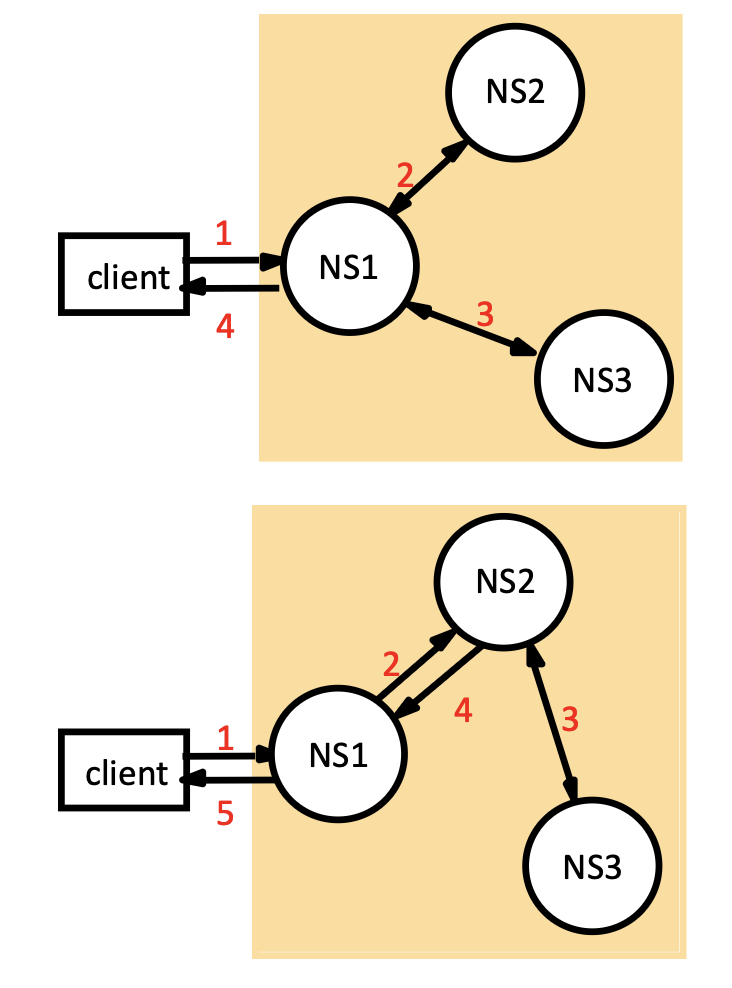
Server-Controlled Hybrid Navigation
- Non-recursive: The server contacts peers via multicast or direct contact to resolve the name, but does not pass the task up to a parent. (Upper graph)
- Recursive: The server passes the request to a "superior" server responsible for a larger namespace prefix (used when low-level servers (managerial layer) cannot contact high-level ones (global layer) directly). (Lower graph)
DNS Specifics
Query Structure
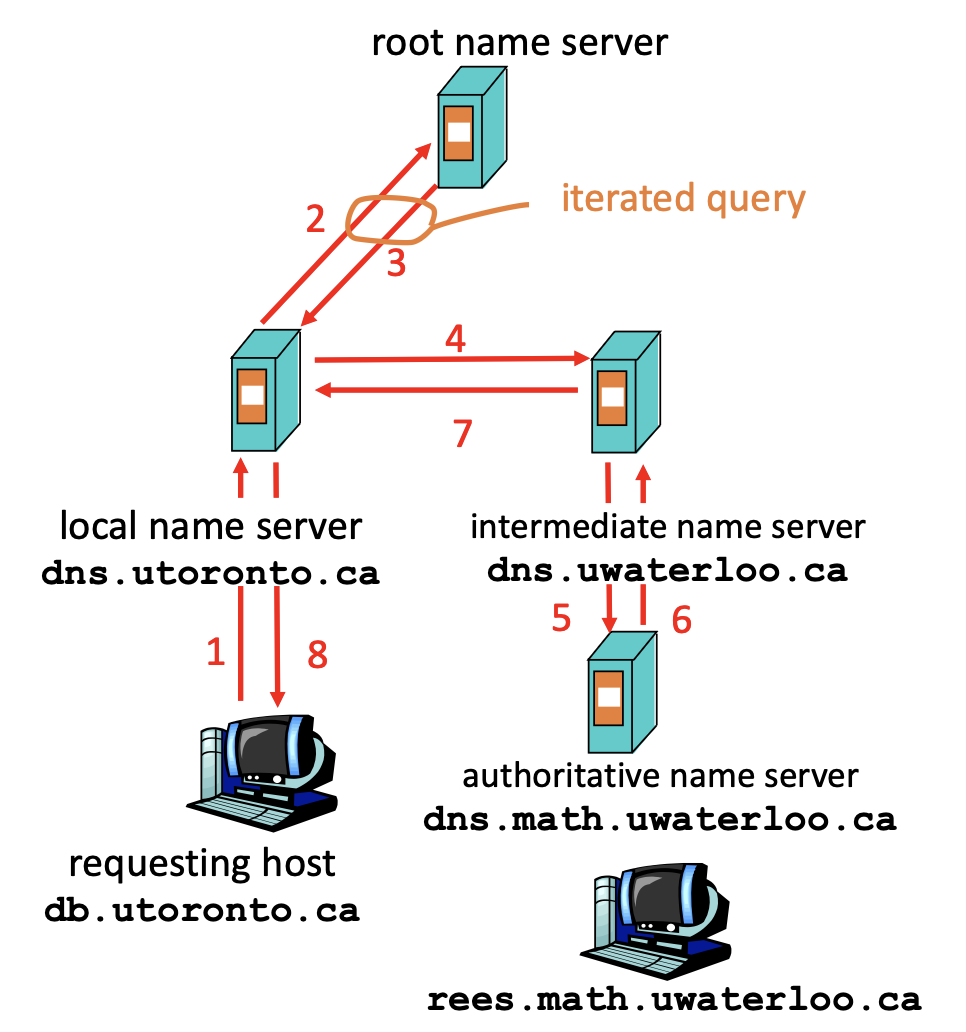
- Recursive Query: Places the burden of resolution on the contacted server. (Heavy load, generally avoided for Root servers).
- Iterated Query: Contacted server replies with the name of the next server to contact. ("I don't know this name, but ask dns.uwaterloo.ca").
DNS Resource Records (RR)
DNS holds records in the format: (name, value, type, ttl).
- Type=A: Maps a hostname to an IP address.
- Type=NS: Maps a domain (e.g.,
foo.com) to its Authoritative Name Server. - Type=CNAME: Maps an alias to the Canonical (real) name.
- Type=MX: Maps a domain to its Mail Server.
DNS Resource Records (RR)
The DNS database is composed of Resource Records (RRs) which store the actual mapping data.
- Format: Entries follow the tuple
(name, value, type, ttl). - Key Record Types:
| Type | Meaning | Main Content (Value) |
|---|---|---|
| A | Host Address | The IP address of the computer. |
| NS | Name Server | The domain name of the authoritative server for this zone. |
| CNAME | Canonical Name | The "real" name for an alias (allows multiple names for one host). |
| SOA | Start of Authority | Parameters governing the zone (e.g., version/serial number). |
| MX | Mail Exchange | The hostname of the mail server handling email for the domain (includes a preference/priority value). |
| PTR | Pointer | Used for Reverse Lookups (mapping an IP back to a name). |
| HINFO | Host Info | Details about the machine architecture and OS. |
| TXT | Text | Arbitrary text strings. |
- Example Zone Data: A typical zone file (e.g., cs.vu.nl) contains a mix of these records, defining the zone's authoritative server (SOA, NS), its mail servers (MX), and the IP addresses of its individual hosts (A). |
DNS Protocol & Messages
DNS uses a standardized message format for both queries and replies.
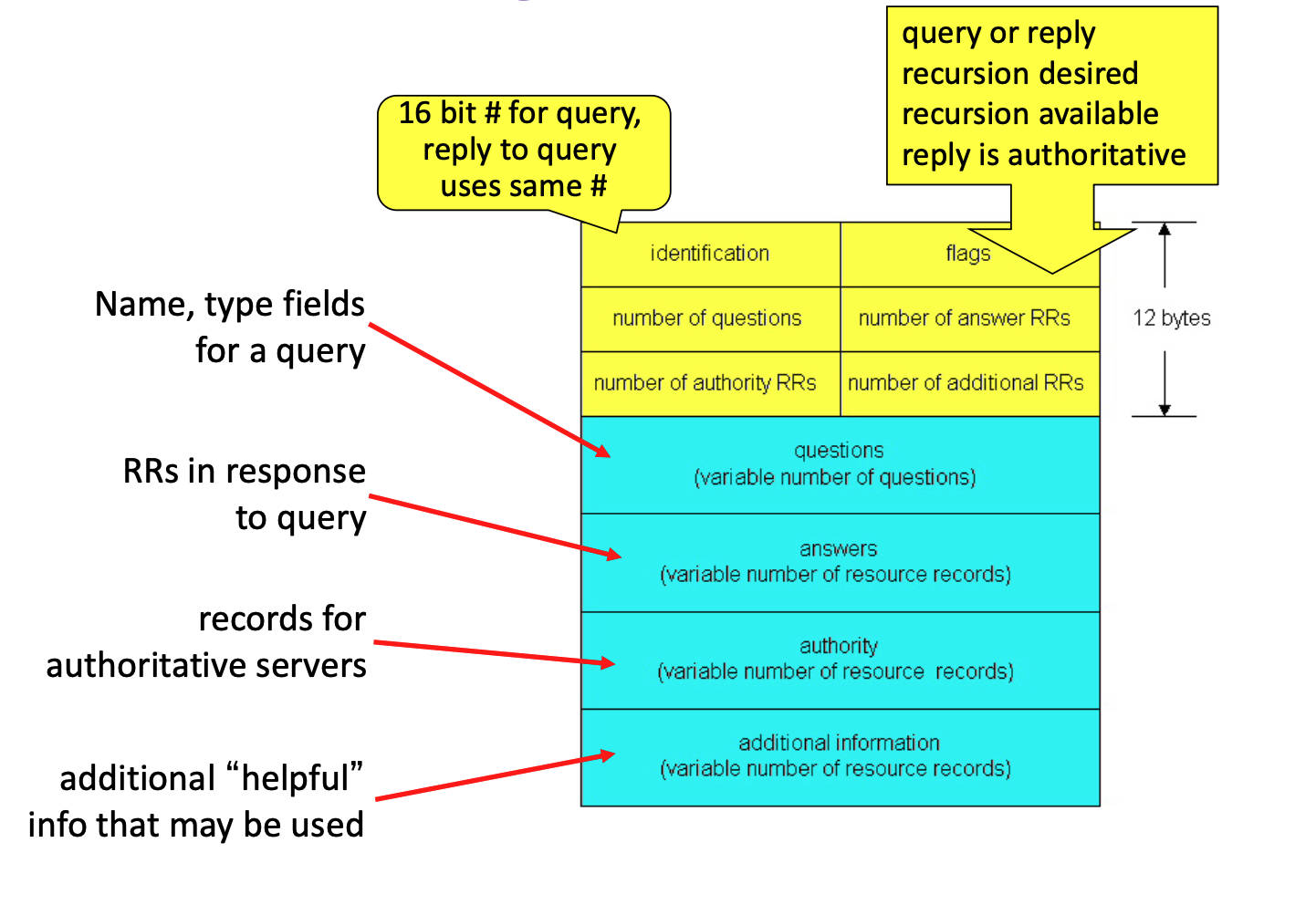
Message Header
- Identification (16-bit): A unique ID number assigned by the client. The server includes this same ID in the reply so the client can match them.
- Flags: Indicate if the message is a query or reply, if recursion is desired/available, and if the reply is authoritative.
- Counts: Specifies the number of entries in the four data sections (Questions, Answers, Authority, Additional).
Message Body Sections
- Questions: The name and type being queried (variable number).
- Answers: The Resource Records (RRs) found for the query.
- Authority: RRs pointing to the authoritative servers (if the answer wasn't found locally).
- Additional: Helpful "extra" info (e.g., the IP address of the mail server returned in the Answer section) to save the client a second lookup.
Directory Services (X.500 & LDAP)
While DNS maps names to machine addresses, Directory Services are designed for finding people and resources based on descriptive attributes (like a "White Pages" book).
X.500 Directory Service
- Standard: A heavy, comprehensive ITU standard for directory services. It isn't a single piece of software you download; it is a series of standards (ITU-T recommendations).
-
Architecture:
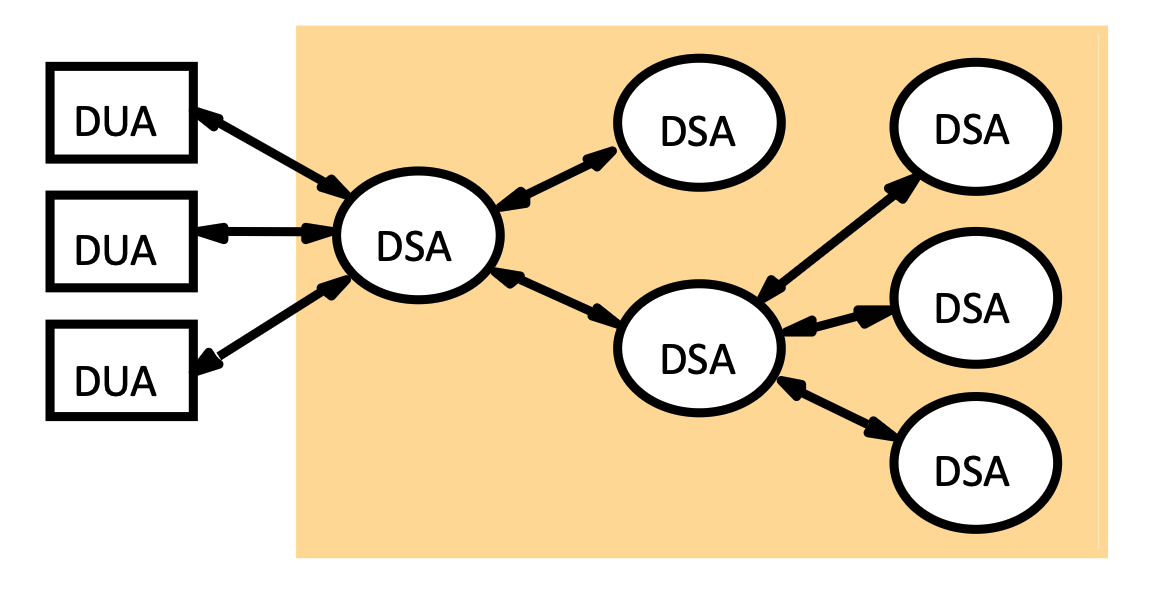
- DUA (Directory User Agent): The client software that makes queries.
- DSA (Directory System Agent): The server that stores the data and executes the search.
-
Structure:
-
DIB (Directory Information Base): The entire database of information.
Each node in the tree (an "Entry") contains a collection of attributes.
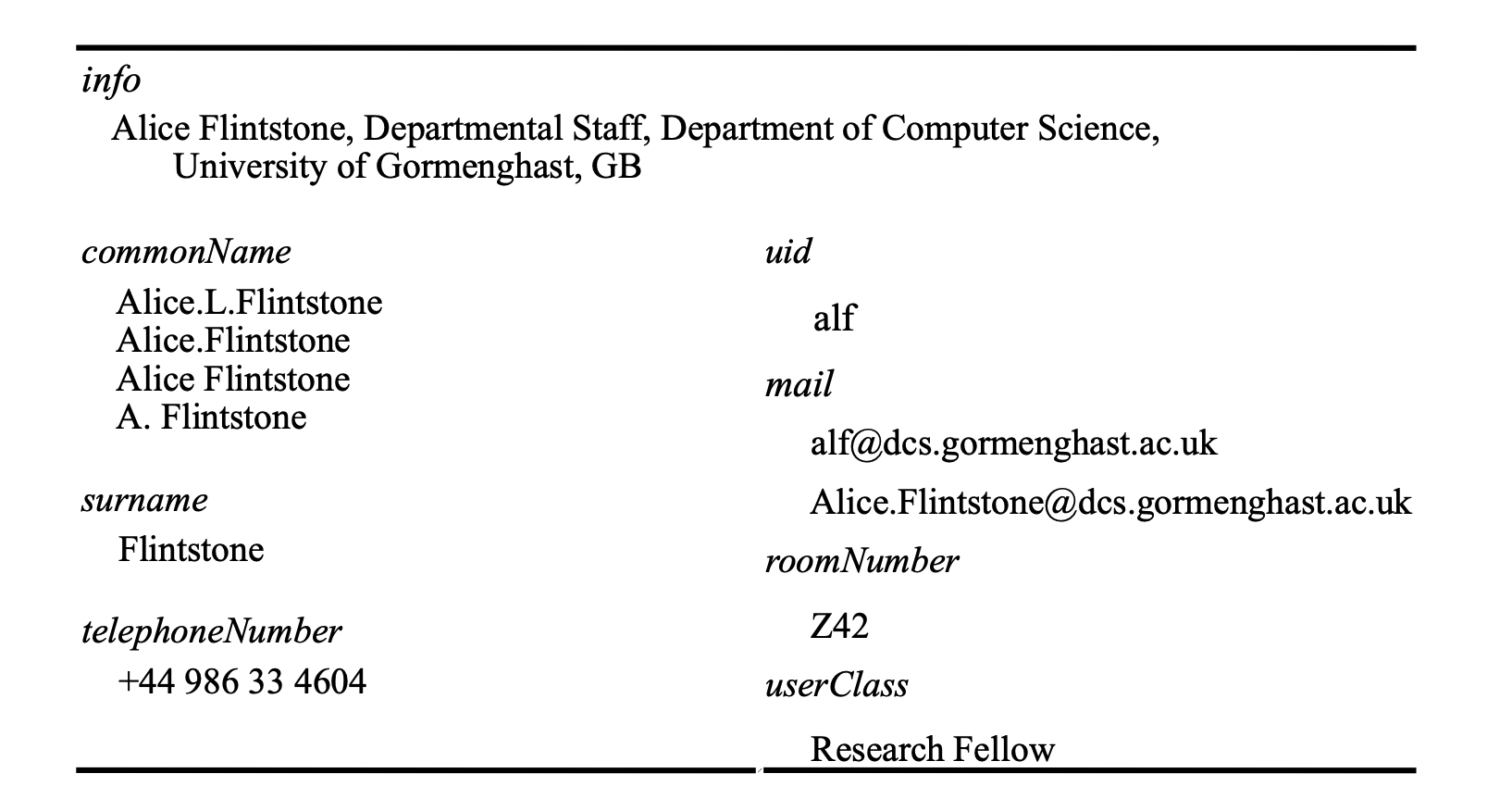
- Example Entry: Alice Flintstone
- Path:
Root\(\rightarrow\)GB\(\rightarrow\)Univ. Gormenghast\(\rightarrow\)Computer Science\(\rightarrow\)Dept. Staff\(\rightarrow\)Alice. - Attributes Stored:
Attribute Value(s) commonName (cn) Alice.L.Flintstone,Alice.Flintstone,A. Flintstone(Aliases supported)surname (sn) Flintstoneuid alfmail alf@dcs.gormenghast.ac.uktelephoneNumber +44 986 33 4604roomNumber Z42userClass Research Fellow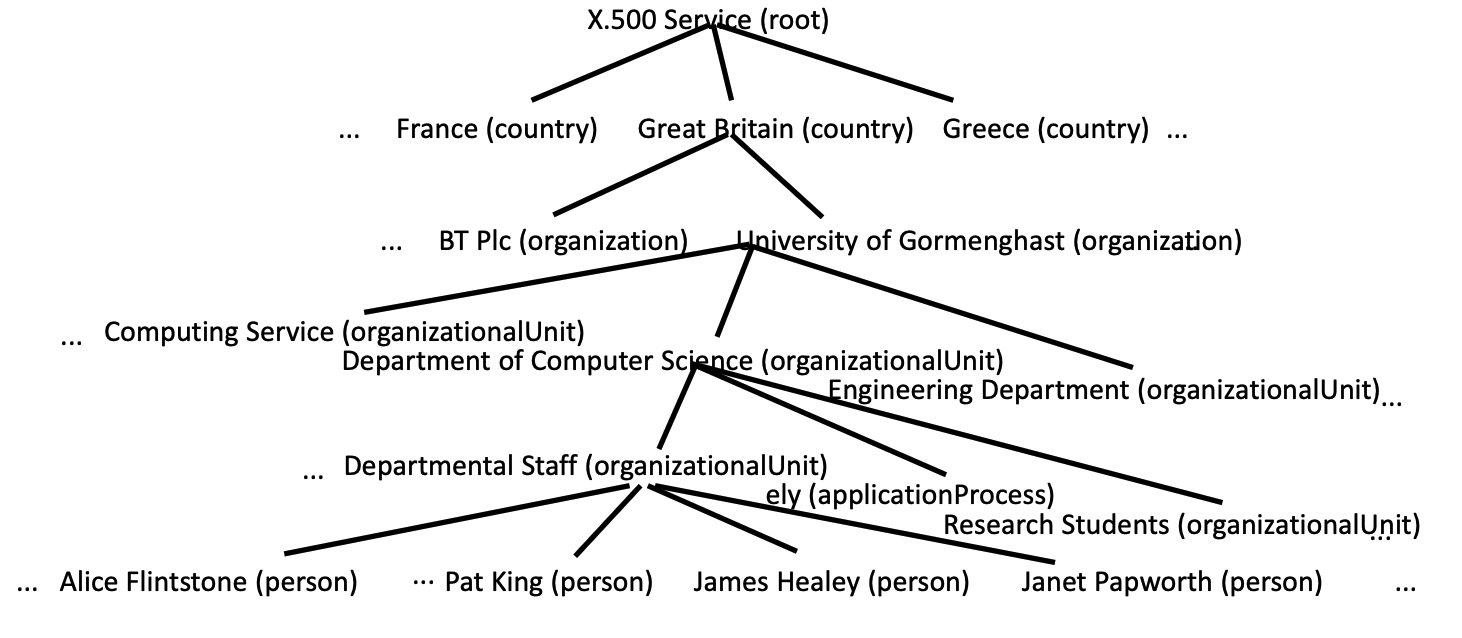
-
DIT (Directory Information Tree): The hierarchical tree structure used to organize the data (Root \(\rightarrow\) Country \(\rightarrow\) Organization \(\rightarrow\) OrgUnit \(\rightarrow\) Person).
Data is organized in a strict hierarchy representing organizational structure rather than network topology:
- Root: The global start point.
- Country (C): e.g., "France", "Great Britain", "Greece".
- Organization (O): e.g., "BT Plc", "University of Gormenghast".
- Organizational Unit (OU): e.g., "Computer Science", "Sales".
- Leaf Node (Person/Resource): e.g., "Alice Flintstone", "Laser Printer".
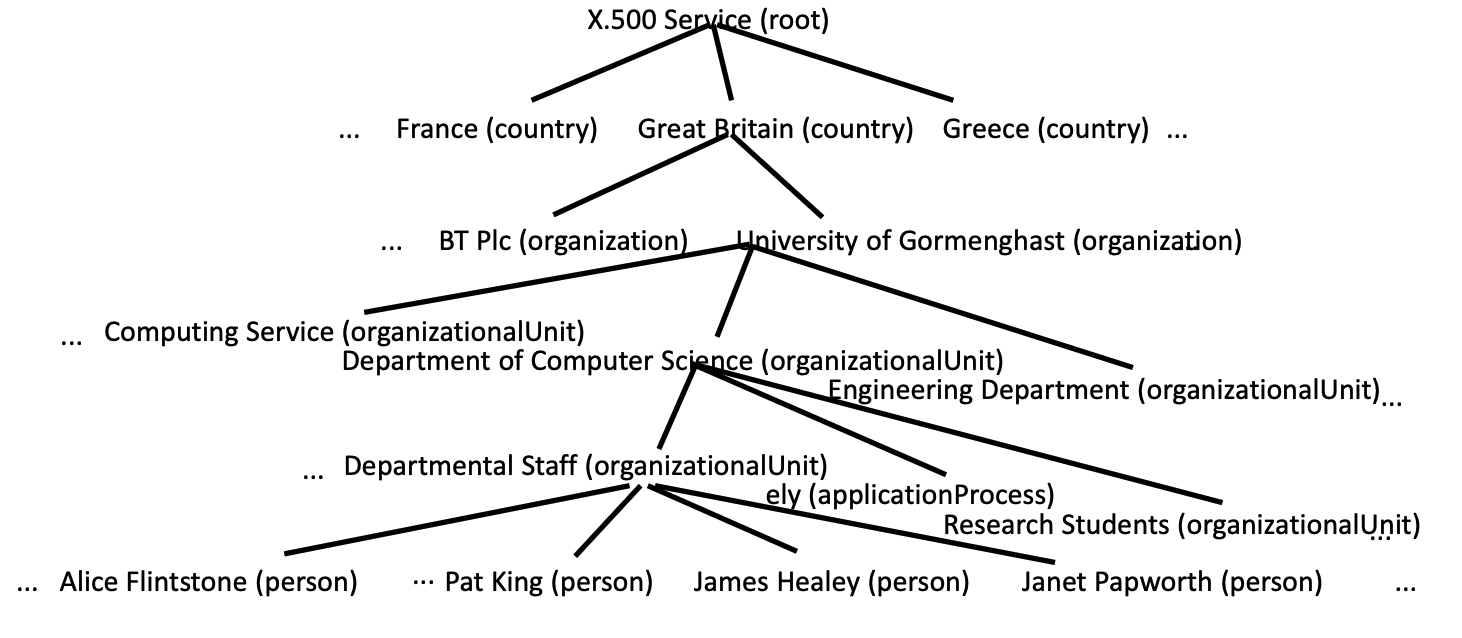
-
The DIT (Directory Information Tree) is the structure. The DIB (Directory Information Base) is the entire collection of data.
- Capabilities: Supports Descriptive Queries (e.g., "Find the email of the person named Alice in the CS department").
- DIB is the "What" (the information itself).
- DIT is the "Where" (how the information is categorized and located).
Operations
Directory services support advanced query logic:
- Read:
- Input: An absolute or relative name (Distinguished Name).
- Relative name only works if the DSA (Directory System Agent) already has a context or a "current directory" established.
- Action: DSA navigates the tree to that specific node.
- Output: Returns the requested attributes (e.g., "Get email for Alice").
- Input: An absolute or relative name (Distinguished Name).
- Search:
- Input: A Base Name (start point) and a Filter Expression.
- Base Name:
ou=Computer Science, o=Univ. Gormenghast, c=GB - Scope: The server jumps straight to the Computer Science department and only searches the people inside that specific branch.
- Base Name:
- Example Filter:
(userClass="Research Fellow" AND roomNumber="Z42"). - Output: A list of all names in that subtree that match the boolean condition.
- Input: A Base Name (start point) and a Filter Expression.
LDAP (Lightweight Directory Access Protocol)
- Definition: A simplified ("lightweight") version of X.500 that runs directly over TCP/IP.
- Key Features:
- Uses simpler APIs and textual encoding (ASN.1) instead of the complex OSI stack used by X.500.
- Widely used in corporate Intranets (e.g., Microsoft Active Directory) for user management.